Run the business
Reports & dashboards
A one-line read on every chart
Dashboards that say what the numbers mean.
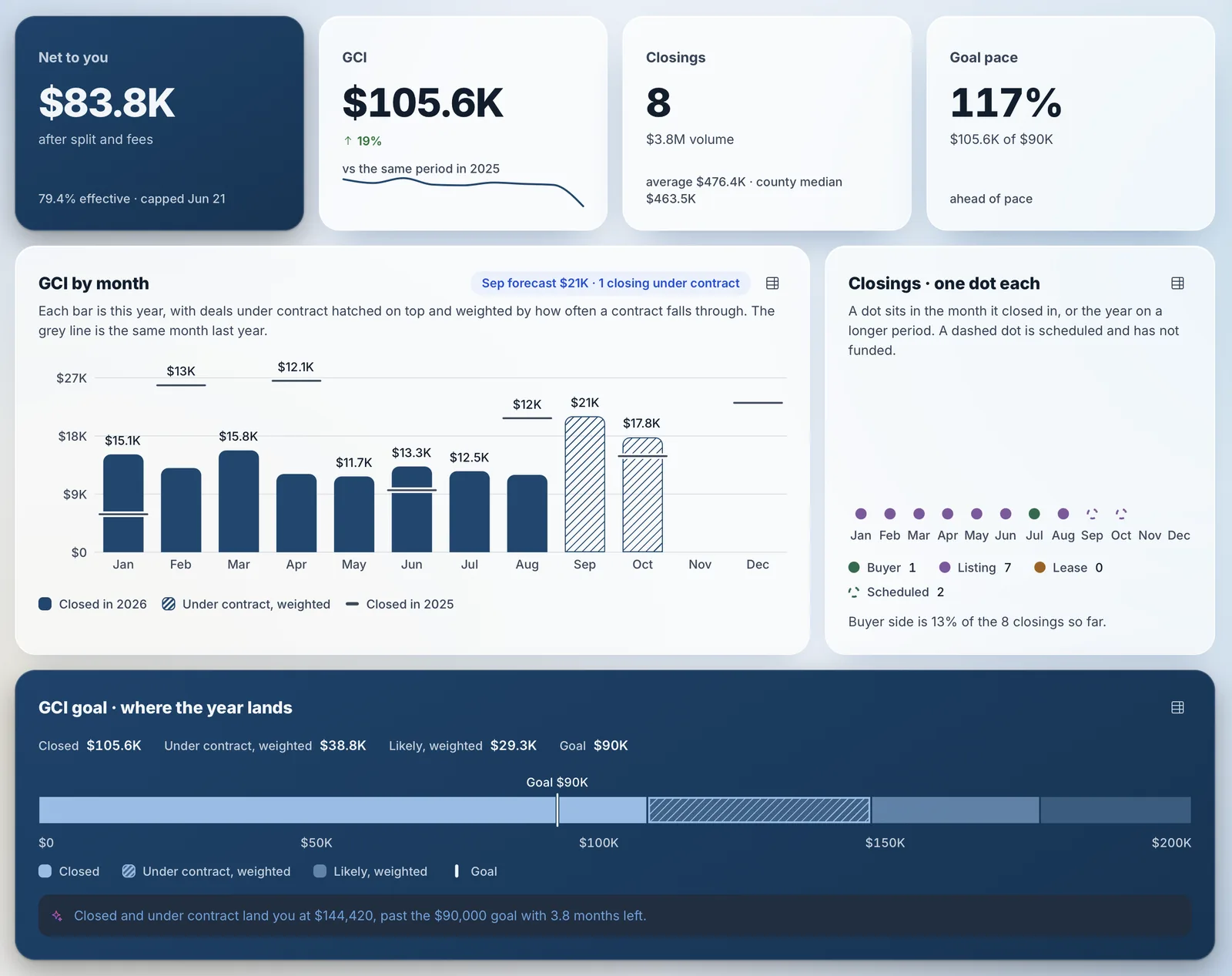
Every dashboard reads the same record, so the numbers agree from the agent to the brokerage, and every chart comes with a one-line read on what it means.
- Executive, office, team and agent dashboards.
- Every view rolls up from agent to team, office and brokerage.
- Net to agent, GCI, closings and goal pace at a glance.
- Forecasts weight deals under contract by how often they fall through.
- Production gained vs. lost, so you can see whether recruiting outpaces departures.
Report library
A report for virtually every part of the business.
Built-in reports cover production, leads, business mix, listings, money, ranking, website traffic and more, each with several reports inside.
- Leads: the AI’s reply and the agent’s reply after handoff, the lead funnel and speed vs. appointments.
- Business mix: sides by type and where your business came from.
- Listings, money and ranking, from days on market to net income and leaderboards.
- Website traffic and Campaign Links, from first visit to closing.
- Pick any time frame, from this month to all time, and export the data behind any chart.
The AI replied to every new lead in seconds. After handoff, 39% heard from their agent within 5 minutes, and 7 never got a personal reply.
AI report builder
Ask for the report you need, and AI builds it.
When a report is not already built, describe it in plain language. The AI picks the data and the chart, and you can save it for next time.
- Ask questions like "Which lead sources closed the most GCI this year?"
- The AI chooses the right chart and explains what it shows.
- Save custom reports, share them with your team or add them to a dashboard.
- Every number traces back to the deals and people behind it.
Listing sides made up 50% of your 8 closings.
- Buyer338%
- Listing450%
- Tenant00%
- Landlord113%
FAQ
Questions about reports.
GCI is the gross commission income on closed deals. Company dollar is what the brokerage keeps after agent splits, before its own expenses.
Every report reads the same record of leads, deals and payouts in VybeOS, so the agent, team and brokerage views agree. Click any chart to open the records behind it.
In two parts. The AI’s first reply is timed on its own, and the agent’s reply after handoff is timed separately, so a fast AI answer never hides a slow agent.
Have another question? Ask us in a demo.
Platform sections
See the report you run your business on.
Tell us the numbers you check every week. We’ll build them and open the records behind them.
Are you an agent? Send VybeOS to your broker or team leader